
Shifter staticizes your entire WordPress site and delivers HTML/CSS via a CDN, thereby separating WordPress from the live site. While this allows you to build a secure and fast site, the staticization process may take a long time for some sites. In such cases, please refer to the following tips to optimize the time required for staticization.
Tip 1: Check your Shifter site settings
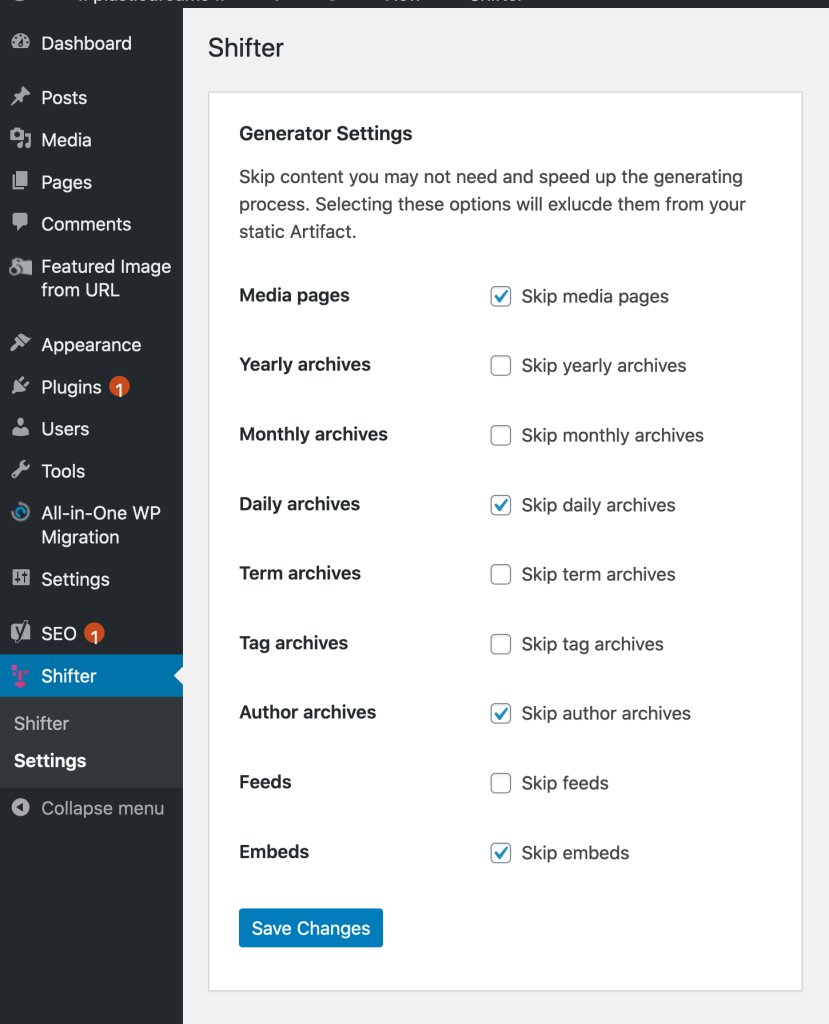
WordPress automatically creates many pages—such as author pages, archives, posts sorted by day, month, or year, and pages for individual media library items—so every time you create a post or upload an image, more than 10 pages are added.
This is a feature of WordPress designed to ensure these pages are immediately available should they be needed for any reason; however, during the static generation process, each of these pages is indexed individually, which can increase processing time.
If you don’t want to add unnecessary pages, you can adjust the additional pages in the Shifter plugin’s “Generator Settings” within the WordPress admin panel.
This adjustment can significantly reduce the time required for the static generation process, so please give it a try.
Tip 2: Disable Incompatible or Unnecessary WordPress Plugins
For details on WordPress plugins that Shifter does not support or that are unnecessary, please refer to the documentation.
For example, security plugins such as WordFence and iThemes are unnecessary because Shifter’s standard features cover these needs. Typical vulnerabilities and exploits in WordPress do not affect the static WordPress sites created with Shifter, and since WordPress is usually disabled, there is no risk of being hacked.
Additionally, Shifter includes services such as DDoS protection and a WAF, all at no extra cost.
In addition, calendar plugins such as Events Calendar Pro, as well as WooCommerce and membership plugins—anything that relies on dynamic PHP functions to operate—can be replaced with alternative plugins or disabled.
Shifter automatically disables plugins that are known to be unsupported during the staticization process or that may cause issues. By completely removing these plugins in advance, you can reduce the time it takes for Shifter to check for and disable them.
That concludes our tips for speeding up the staticization process.